I have been writing for Culinary Aspiration food blog for a few months now, and can you believe I do not know how to put a degree temperature symbol. After searching and confirming with the Mac keyboard viewer, you can place type a degree temperature symbol in two ways.
Option+Shift+8 °
Option+k ˚
They do look a little different and I will probably use the first as the symbol is bigger.
Showing posts with label Blog Tips. Show all posts
Showing posts with label Blog Tips. Show all posts
Tuesday, March 2, 2010
Wednesday, February 24, 2010
A Smarter Related Posts Widget for Blogger
I have searched and tried out a few different techniques and widgets to provide Related Posts functionality. For my Culinary Aspiration blog, using the LinkWithin widget is perfect as it provides thumbnails to enhance the blog. For this blog, I don't need thumbnails! I did try using LinkWithin and it works ok, but I wanted to avoid pulling data from yet another source. I finally found what I was looking for. The post jQuery + GData API = A Smarter Related Posts widget for Blogger on More Tech Tips does a great job explain how to incorporate into your blog.
To add this Related Posts widget,
1) Go to Blogger > Layout > Page Elements
2) Click on Add a Gadget.
3) Select the category Basics, and then click the + sign next to HTML/JavaScript.
4) Leave the Title blank. I copied and pasted the code into the Content box and then click SAVE.
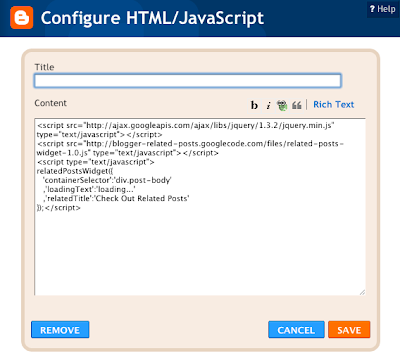
5) Drag the newly added gadget under Blog Posts.
6) Click SAVE to save your page elements layout.
7) That's it! You can now check out your blog.

To add this Related Posts widget,
1) Go to Blogger > Layout > Page Elements
2) Click on Add a Gadget.
3) Select the category Basics, and then click the + sign next to HTML/JavaScript.
4) Leave the Title blank. I copied and pasted the code into the Content box and then click SAVE.

5) Drag the newly added gadget under Blog Posts.
6) Click SAVE to save your page elements layout.
7) That's it! You can now check out your blog.

Wednesday, February 17, 2010
Adding Feedjit Widget to my Blogs
Now that I have started writing on a couple of blogs, I am more observant whenever I visit other blog sites and the various widgets that have been incorporated. Whenever I see the Feedjit Live Traffic Feed, I always take a glance to observe where around the globe people are surfing at that moment. So it was time to add to my sites geekwithme.blogspot.com and culinaryaspiration.blogspot.com. I was surprised how easy it was to add the Feedjit widget.

2) Select which blog you want the Feedjit widget to be added. Click ADD WIDGET.

3) Position the widget to the desired place on your webpage. Click SAVE.

4) Now, go check your website to see the live traffic feed.

1) Browse to the Feedjit url http://feedjit.com/joinjs/#. Click Click to Add to Blogger under the Live Traffic Feed

2) Select which blog you want the Feedjit widget to be added. Click ADD WIDGET.

3) Position the widget to the desired place on your webpage. Click SAVE.

4) Now, go check your website to see the live traffic feed.

Friday, November 13, 2009
LinkWithin Widget
I found the perfect widget that would be useful for a food blog called LinkWithin. LinkWithin is a blog widget that can be placed under each post, linking to other related posts from your blog archive. If a reader initially arrives at the blog for a particular recipe or post, then there is a tremendous opportunity to hold their attention a bit longer with another related recipe or enticing photo of some other dish. Best of all, the widget is free and ad-free! You can see it in action at Culinary Aspiration blog.
I wonder if this would work in a Tech blog?
I wonder if this would work in a Tech blog?
Wednesday, November 11, 2009
Printable Recipe Page
I just started a food blog called Culinary Aspiration. One useful feature I noticed on other blogs is the Printable Recipe page. I found a quick and easy way to accomplish this. Here is the link on how to make a Printable Recipe Page.
Subscribe to:
Posts (Atom)


 Posts
Posts

